Markdown
table generator
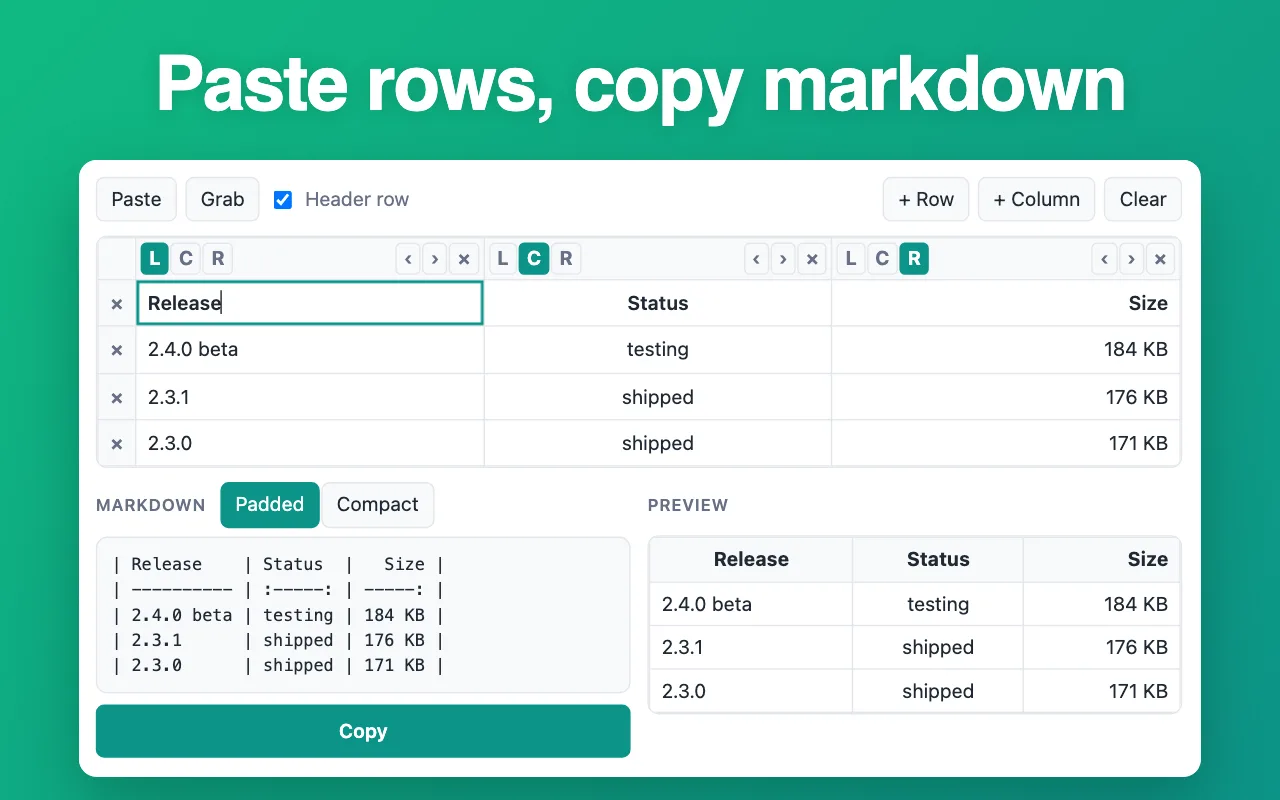
Paste cells from Excel, Google Sheets or a CSV file. They spread out into a grid you can edit, and the markdown below stays lined up as you go.
Markdown
Keep it one click away
The free Markdown Table Generator extension does this from the Chrome toolbar: paste, tweak, copy, without hunting for this page while you write a README or a ticket.
Add Markdown Table Generator to ChromeHow to make a markdown table
- Paste cells from a spreadsheet, a CSV file or an existing markdown table.
- Fix any cell in the grid and choose the alignment for each column.
- Press “Copy markdown” and paste it into GitHub, Notion, Obsidian or your docs.
Questions people ask
Can I paste straight from Excel or Google Sheets?
Yes. Select the cells, copy, and paste into the box. Spreadsheets copy cells separated by tabs, and the generator reads them as columns.
Which CSV formats work?
Comma, semicolon and tab separated files. Quoted values with commas or line breaks inside them are kept as one cell.
What happens to a | character inside a cell?
It is escaped as \| so it does not split the column. Line breaks inside a cell become <br>, which GitHub renders as a new line.
How do I align a column to the right?
Use the arrows above the column. The markdown gets the matching :--- , :---: or ---: rule, and the spaces line up the same way so the raw text is readable too.
Can I edit an existing markdown table?
Yes. Paste the markdown table into the box. It is read back into cells, so you can fix a value or realign it and copy it again.
Is my data uploaded?
No. The table is built in this tab. Nothing leaves your computer.